> ## Documentation Index
> Fetch the complete documentation index at: https://docs.uniblock.dev/llms.txt
> Use this file to discover all available pages before exploring further.
# Backup providers
> Automatic failover to backup providers when primary providers are unavailable.
# What are backup providers?
Backup providers help prevent failures caused by a single provider issue. When your primary provider is unavailable, hits a provider-specific rate limit, or returns errors, Uniblock automatically routes requests to backup providers in your configured priority list.
If you receive a `429` from Uniblock itself, that means your project has reached the request limit available under your current Uniblock plan. In that case, backup providers do not override the plan-level limit.
**Use backup providers when you need:**
* 99.99%+ uptime guarantees
* Protection against provider outages
* Automatic provider failover when an upstream provider is rate-limited
* Zero-downtime failover
Backup providers are enabled by default for all Uniblock users. No configuration required.
***
## How it works
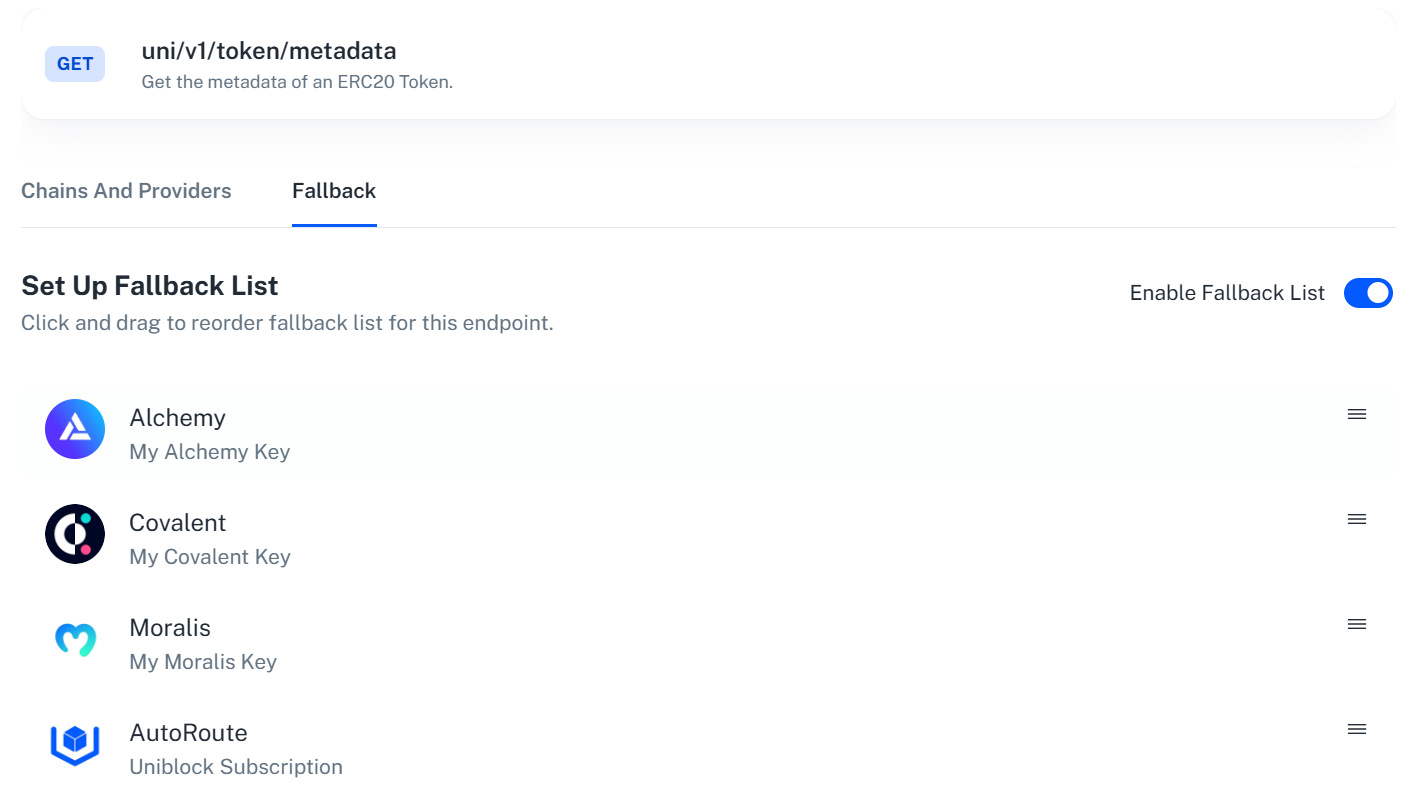
Uniblock maintains a priority list (fallback list) of providers for each endpoint category. When a request fails:
1. **Primary attempt** - Request goes to your top-priority provider
2. **Failure detection** - System detects failure (timeout, rate limit, 5xx error, invalid key)
3. **Automatic failover** - Request immediately routes to next provider in list
4. **Seamless response** - Your application receives the response without knowing a failover occurred
Backup providers handle upstream provider failures and provider-specific rate limits. Uniblock plan limits still apply separately, and a `429` response from Uniblock means your project has exceeded the request rate included with your current plan.
 ***
## Fallback list types
### Internal fallback (default)
Uniblock's pre-configured provider list optimized for reliability and cost.
**Characteristics:**
* No setup required
* Enabled by default for all users
* Optimized based on real-time provider performance
* Includes 30+ blockchain data providers
* Automatically updated as provider performance changes
**Example internal fallback list for token balances:**
1. Covalent (lowest cost, high reliability)
2. Moralis (medium cost, high reliability)
3. Alchemy (higher cost, highest reliability)
4. QuickNode (backup)
```bash Using internal fallback (default) theme={null}
curl --location \
'https://api.uniblock.dev/uni/v1/token/balances?chainId=1&address=0x742d35Cc6634C0532925a3b844Bc9e7595f0bEb' \
--header 'x-api-key: YOUR_API_KEY'
```
If Covalent fails → automatically tries Moralis → then Alchemy → then QuickNode.
### External keys fallback (custom)
Bring your own provider API keys and configure custom priority lists.
**Characteristics:**
* Use your existing provider credits
* Full control over provider priority
* Uniblock auto-routing as final fallback
* Configure different lists per endpoint category
**Example custom fallback list:**
1. Your Alchemy key (primary)
2. Your Infura key (backup)
3. Your QuickNode key (backup)
4. Uniblock auto-routing (final fallback)
**Benefits of this approach:**
* Consume your own provider credits first
* Uniblock provides ultimate reliability as final backup
* Custom routing based on your provider relationships
* Unified management of all provider keys
[Learn how to configure custom fallback lists →](/guides/uniblock/autorouting/dashboard-integrations)
***
## Common failure scenarios
### Upstream provider rate limit exceeded
**Scenario:** Your Alchemy key hits its own provider rate limit (300 requests/second).
**What happens:**
1. Request #301 fails with rate limit error
2. Uniblock detects rate limit response
3. Request automatically routes to Infura (next in list)
4. Your app receives successful response
**Result:** Zero downtime, seamless failover for that provider-specific limit.
This is different from a Uniblock `429`. A Uniblock `429` means your project has reached the request limit included with your current plan, not that a backup provider should be tried.
### Provider outage
**Scenario:** Infura experiences a service outage.
**What happens:**
1. Request times out after 5 seconds
2. Uniblock detects timeout
3. Request automatically routes to QuickNode
4. Your app receives successful response
**Result:** Your users never notice the outage.
### Invalid API key
**Scenario:** Your provider API key expires or is invalid.
**What happens:**
1. Request fails with 401 authentication error
2. Uniblock detects invalid key
3. Request automatically routes to next provider
4. Dashboard alerts you to update the key
**Result:** Service continues while you fix the key.
### Provider-specific error
**Scenario:** Provider returns 5xx server error.
**What happens:**
1. Request fails with 500 internal server error
2. Uniblock detects server error
3. Request automatically routes to next provider
4. Your app receives successful response
**Result:** Provider issues don't affect your application.
***
## Configuration example
Here's how a custom fallback list works with your own provider keys:
In the [Uniblock dashboard](https://dashboard.uniblock.dev), add your provider API keys:
* Alchemy: `alch_abc123...`
* Infura: `infura_xyz789...`
* QuickNode: `qn_def456...`
Set your fallback order for token endpoints:
1. Alchemy (your key)
2. Infura (your key)
3. QuickNode (your key)
4. Uniblock auto-routing (final backup)
```bash theme={null}
curl --location \
'https://api.uniblock.dev/uni/v1/token/balances?chainId=1&address=0x742d35Cc6634C0532925a3b844Bc9e7595f0bEb' \
--header 'x-api-key: YOUR_UNIBLOCK_KEY'
```
If Alchemy fails, Uniblock automatically tries Infura, then QuickNode, then its own provider pool. Your code never changes.
***
## Key benefits
Achieve 99.99%+ uptime with multi-provider redundancy.
Automatic provider switching transparent to your application.
Reduce provider-specific rate limit failures by automatically switching to backup providers.
Use cheaper providers first, expensive ones as backup.
***
## Monitoring and alerts
Track failover events in the Uniblock dashboard:
* **Failover count** - How many times backup providers were used
* **Provider health** - Real-time status of each provider
* **Error breakdown** - Types of failures triggering failovers
* **Cost analysis** - Which providers are being used most
**Alerts available:**
* Provider key expiration warnings
* High failover rate notifications
* Provider performance degradation alerts
***
## Best practices
**Use Uniblock auto-routing as final fallback** - Even with your own provider keys, add Uniblock auto-routing as the last item in your priority list for ultimate reliability.
**Configure different lists per endpoint category** - Token endpoints may need different providers than NFT endpoints. Optimize each category separately.
**Monitor failover rates** - High failover rates indicate issues with your primary provider. Review and adjust your priority list.
**Test your fallback configuration** - Temporarily disable your primary provider to verify failover works as expected.
***
## Next steps
Set up custom fallback lists with your own provider keys.
Learn how auto-retry works before failover occurs.
Optimize provider selection for cost and performance.
Monitor provider health and failover events.
***
## Common pitfalls
**Don't rely on a single provider** - Even with backup providers, test your configuration to ensure failover works correctly.
**Provider key expiration** - Set up alerts for expiring provider keys. Expired keys trigger unnecessary failovers.
**Inconsistent data across providers** - Different providers may return slightly different data formats. Test thoroughly when switching providers.
**Cost implications** - Backup providers may have different pricing. Monitor which providers are being used to manage costs effectively.
***
Create your free account and start building with unified blockchain infrastructure across 100+ chains.
Explore all available endpoints and interactive playgrounds
Get help from our team and connect with other developers
***
## Fallback list types
### Internal fallback (default)
Uniblock's pre-configured provider list optimized for reliability and cost.
**Characteristics:**
* No setup required
* Enabled by default for all users
* Optimized based on real-time provider performance
* Includes 30+ blockchain data providers
* Automatically updated as provider performance changes
**Example internal fallback list for token balances:**
1. Covalent (lowest cost, high reliability)
2. Moralis (medium cost, high reliability)
3. Alchemy (higher cost, highest reliability)
4. QuickNode (backup)
```bash Using internal fallback (default) theme={null}
curl --location \
'https://api.uniblock.dev/uni/v1/token/balances?chainId=1&address=0x742d35Cc6634C0532925a3b844Bc9e7595f0bEb' \
--header 'x-api-key: YOUR_API_KEY'
```
If Covalent fails → automatically tries Moralis → then Alchemy → then QuickNode.
### External keys fallback (custom)
Bring your own provider API keys and configure custom priority lists.
**Characteristics:**
* Use your existing provider credits
* Full control over provider priority
* Uniblock auto-routing as final fallback
* Configure different lists per endpoint category
**Example custom fallback list:**
1. Your Alchemy key (primary)
2. Your Infura key (backup)
3. Your QuickNode key (backup)
4. Uniblock auto-routing (final fallback)
**Benefits of this approach:**
* Consume your own provider credits first
* Uniblock provides ultimate reliability as final backup
* Custom routing based on your provider relationships
* Unified management of all provider keys
[Learn how to configure custom fallback lists →](/guides/uniblock/autorouting/dashboard-integrations)
***
## Common failure scenarios
### Upstream provider rate limit exceeded
**Scenario:** Your Alchemy key hits its own provider rate limit (300 requests/second).
**What happens:**
1. Request #301 fails with rate limit error
2. Uniblock detects rate limit response
3. Request automatically routes to Infura (next in list)
4. Your app receives successful response
**Result:** Zero downtime, seamless failover for that provider-specific limit.
This is different from a Uniblock `429`. A Uniblock `429` means your project has reached the request limit included with your current plan, not that a backup provider should be tried.
### Provider outage
**Scenario:** Infura experiences a service outage.
**What happens:**
1. Request times out after 5 seconds
2. Uniblock detects timeout
3. Request automatically routes to QuickNode
4. Your app receives successful response
**Result:** Your users never notice the outage.
### Invalid API key
**Scenario:** Your provider API key expires or is invalid.
**What happens:**
1. Request fails with 401 authentication error
2. Uniblock detects invalid key
3. Request automatically routes to next provider
4. Dashboard alerts you to update the key
**Result:** Service continues while you fix the key.
### Provider-specific error
**Scenario:** Provider returns 5xx server error.
**What happens:**
1. Request fails with 500 internal server error
2. Uniblock detects server error
3. Request automatically routes to next provider
4. Your app receives successful response
**Result:** Provider issues don't affect your application.
***
## Configuration example
Here's how a custom fallback list works with your own provider keys:
In the [Uniblock dashboard](https://dashboard.uniblock.dev), add your provider API keys:
* Alchemy: `alch_abc123...`
* Infura: `infura_xyz789...`
* QuickNode: `qn_def456...`
Set your fallback order for token endpoints:
1. Alchemy (your key)
2. Infura (your key)
3. QuickNode (your key)
4. Uniblock auto-routing (final backup)
```bash theme={null}
curl --location \
'https://api.uniblock.dev/uni/v1/token/balances?chainId=1&address=0x742d35Cc6634C0532925a3b844Bc9e7595f0bEb' \
--header 'x-api-key: YOUR_UNIBLOCK_KEY'
```
If Alchemy fails, Uniblock automatically tries Infura, then QuickNode, then its own provider pool. Your code never changes.
***
## Key benefits
Achieve 99.99%+ uptime with multi-provider redundancy.
Automatic provider switching transparent to your application.
Reduce provider-specific rate limit failures by automatically switching to backup providers.
Use cheaper providers first, expensive ones as backup.
***
## Monitoring and alerts
Track failover events in the Uniblock dashboard:
* **Failover count** - How many times backup providers were used
* **Provider health** - Real-time status of each provider
* **Error breakdown** - Types of failures triggering failovers
* **Cost analysis** - Which providers are being used most
**Alerts available:**
* Provider key expiration warnings
* High failover rate notifications
* Provider performance degradation alerts
***
## Best practices
**Use Uniblock auto-routing as final fallback** - Even with your own provider keys, add Uniblock auto-routing as the last item in your priority list for ultimate reliability.
**Configure different lists per endpoint category** - Token endpoints may need different providers than NFT endpoints. Optimize each category separately.
**Monitor failover rates** - High failover rates indicate issues with your primary provider. Review and adjust your priority list.
**Test your fallback configuration** - Temporarily disable your primary provider to verify failover works as expected.
***
## Next steps
Set up custom fallback lists with your own provider keys.
Learn how auto-retry works before failover occurs.
Optimize provider selection for cost and performance.
Monitor provider health and failover events.
***
## Common pitfalls
**Don't rely on a single provider** - Even with backup providers, test your configuration to ensure failover works correctly.
**Provider key expiration** - Set up alerts for expiring provider keys. Expired keys trigger unnecessary failovers.
**Inconsistent data across providers** - Different providers may return slightly different data formats. Test thoroughly when switching providers.
**Cost implications** - Backup providers may have different pricing. Monitor which providers are being used to manage costs effectively.
***
Create your free account and start building with unified blockchain infrastructure across 100+ chains.
Explore all available endpoints and interactive playgrounds
Get help from our team and connect with other developers